How to choose the best myofunctional therapy app for kids
There is no single best myofunctional therapy app for every child. The best one is the one that matches your child's situation: whether they already have a therapist, whether that therapist uses a particular platform, and what will get your child to practice again tomorrow. This guide explains the four types of myofunctional therapy app, what each is good for, and seven things to check before you download one.
We make one of these apps. MyoGo is a game-based myofunctional therapy app for kids, so read this page knowing that. We've kept it about types of app and how to judge them, and we say plainly below where MyoGo isn't the right choice.
What a myofunctional therapy app is
A myofunctional therapy app is an app that helps someone do the daily mouth, tongue, lip and breathing exercises used in orofacial myofunctional therapy. Therapy itself is planned by a trained professional. The app's job is the home practice in between appointments: showing the move, timing it, reminding the family, and keeping a record that practice happened.
No app examines a child, decides whether they need therapy or builds a treatment plan on its own. If your child hasn't been assessed, start with a professional.
The four types of myofunctional therapy app
1. Game-based practice apps
The exercise is the game control. A child doesn't watch a video and copy it; their own cheek puff, open jaw or tongue click makes something happen on screen. These are built for children and for the motivation problem, and they usually follow a general routine instead of an individual plan.
2. Exercise video libraries
Step-by-step demonstrations you work through at your own pace, often with timers and a progress log. Many are made for adults, sometimes with a separate children's section. They suit families who are happy to lead practice themselves.
3. Therapist-run platforms
The therapist builds the plan, assigns exercises and can see whether practice was done. Families normally can't sign up alone; the clinic invites you. These are the only type that gives your child an individual plan and gives the therapist feedback.
4. Apps for one clinic or one condition
Some apps are made for the patients of a single practice. Others are made for adults who snore or have sleep apnea. Both turn up in searches for children's apps, but neither was designed for a child working through a general home program.
The four types compared
| Type of app | Best when | Individual plan? | Therapist needed to start? | Main limit |
|---|---|---|---|---|
| Game-based practice | A child resists daily practice | No, a general routine | No | Can't check moves inside the mouth |
| Exercise video library | A parent will lead practice | No, you pick from a library | No | Relies on the child staying interested |
| Therapist-run platform | Your therapist already uses one | Yes, set by the therapist | Yes | Only available through a clinic |
| Clinic or condition app | You are that clinic's patient, or an adult who snores | Varies | Often | Not designed for children in general |
Which type fits your child
- Your therapist uses a platform. Use theirs. They can see your child's practice and adjust the plan, which no stand-alone app can do.
- Your child has a plan but won't practice. A game-based app or a children's video library can make the daily part easier. Tell the therapist what you're using.
- You want to lead practice yourself. A video library gives you the demonstrations and leaves the pace to you.
- Your child hasn't been assessed. Start with a dentist, pediatrician, ENT or speech-language pathologist, not an app.
- You need Android. Check the listing first. Several children's apps, including MyoGo, are iPhone and iPad only. Browser-based platforms work on any device.
Seven things to check before you download
- Who it was built for. An adult snoring program isn't a children's program, even when the exercises overlap.
- Whether it needs a provider. Some apps only work with an invitation or code from a clinic.
- How it knows the exercise was done. A timer, a parent tick-box, or the camera and microphone? Each is fine if the app is honest about it.
- What happens to camera and microphone input. Look for processing on the device, with nothing recorded or uploaded.
- The privacy label. On the App Store, scroll to "App Privacy". For a child's app, fewer data types is better, and "Data Not Collected" is the least possible.
- Accounts and ads. A young child shouldn't need a login, and a therapy app shouldn't show them advertising.
- The cost model. Free download with a subscription, a one-time program purchase, or paid through your clinic. Check whether there's a free trial and how to cancel.
Red flags
- Promised results. Claims that an app will change a child's face, widen a palate, straighten teeth or cure snoring aren't something an app can guarantee. The research on myofunctional therapy in children is still limited, and results depend on the child and the cause.
- Before-and-after photos used as proof.
- Claims to verify tongue position inside the mouth. A phone camera can't see behind closed lips.
- "No professional needed." A blocked nose, enlarged tonsils or a tongue-tie need a proper look, and exercises don't replace that.
Where MyoGo fits, and where it doesn't
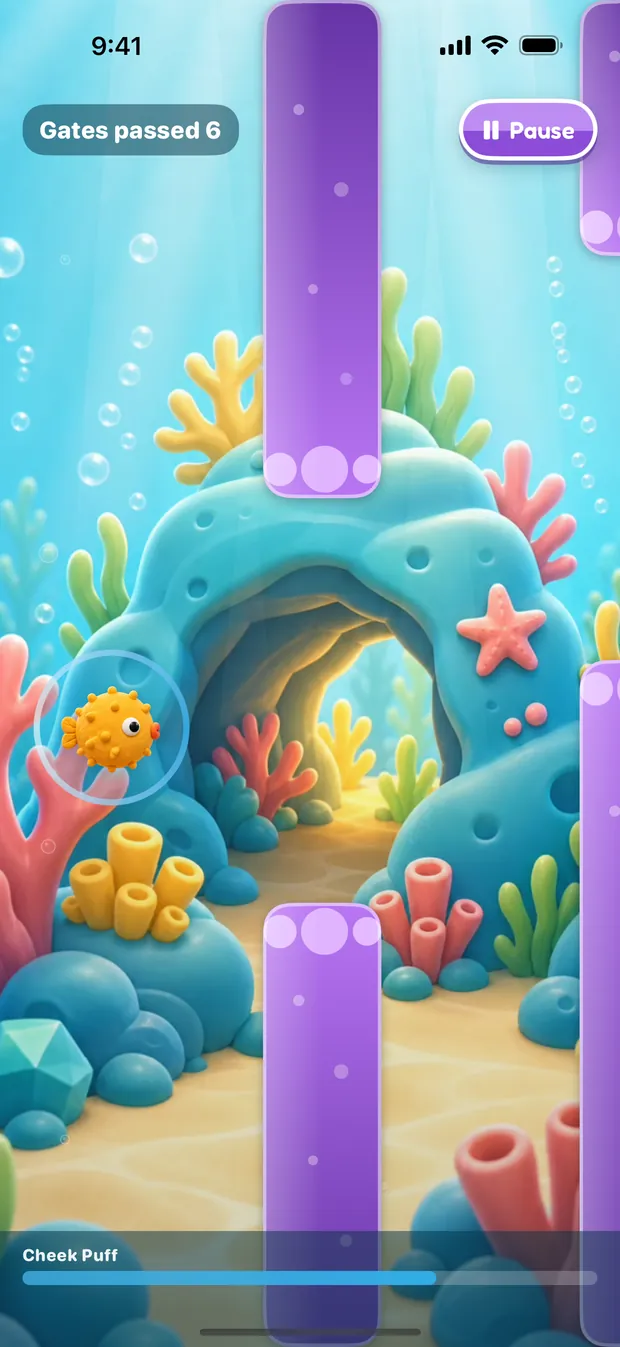
MyoGo is a game-based myofunctional therapy app for kids on iPhone and iPad. It fits when the hard part is getting a child to do the daily practice. Ten games use moves like a cheek puff, an open jaw, a tongue click or a steady breath as the controls, and a guided routine takes about five minutes a day.
Against the checklist above: it's built for children with a parent, needs no provider, and uses the front camera and microphone for the moves they can pick up. That input is processed on the device and never recorded or uploaded. There are no ads and no accounts, and the App Store privacy label is "Data Not Collected". It's free to download, with a subscription and a free trial for the full routine.
MyoGo isn't the right choice when you need any of these:
- An individual plan. Every child follows the same general progression. MyoGo doesn't assess a child or select exercises for them.
- A therapist dashboard. A parent can export a progress summary to share, but a therapist can't log in and assign exercises.
- Android. MyoGo is iPhone and iPad only.
- Proof of technique inside the mouth. Tongue placement behind closed lips is taught by demo video and still needs a person to check.
Common questions
What is the best myofunctional therapy app for kids?
There isn't one best myofunctional therapy app for every child. If your child's therapist uses a platform, that is the best choice because the therapist can see practice and adjust the plan. If the difficulty is getting a child to practice at all, a game-based app such as MyoGo, which turns the exercises into games on iPhone and iPad, is designed for that.
Is there a myofunctional therapy app that works as a game?
Yes. MyoGo is a game-based myofunctional therapy app for kids on iPhone and iPad. A child's cheek puffs, jaw opening, tongue clicks and breathing control ten games. It is a practice tool and does not assess or diagnose.
Are there free myofunctional therapy apps?
Some apps are free, and many are free to download with a paid subscription or paid programs inside. MyoGo is free to download and offers a free trial of its full routine. Check each App Store listing for current pricing.
Can an app replace a myofunctional therapist?
No. An app can't examine a child, choose exercises for them or check tongue position inside the mouth. Apps support the home practice a professional has set.
Is a myofunctional therapy app safe for my child's privacy?
It varies by app. Check the App Store privacy label, whether an account is required, and what happens to camera input. MyoGo has no accounts or ads. Camera and microphone input is processed on the device and never recorded. The App Store privacy label is Data Not Collected. Practice history is saved on the device, and parents choose whether to share a report.
What age can a child start using a myofunctional therapy app?
A child needs to be able to follow simple instructions and copy movements, which for many children is around age four or five. MyoGo is designed for children aged 4 to 14 with a parent. Your provider can tell you whether your child is ready.
Try the game-based optionMyoGo is free to download on iPhone and iPad, with a free trial of the full routine.
Get MyoGo on the App StoreMyoGo is a general wellness and educational practice tool. This page is general information, not medical advice, diagnosis or treatment, and it does not replace care from a qualified professional.